Home office setup
Calm Home Office Setup for Focused Everyday Work
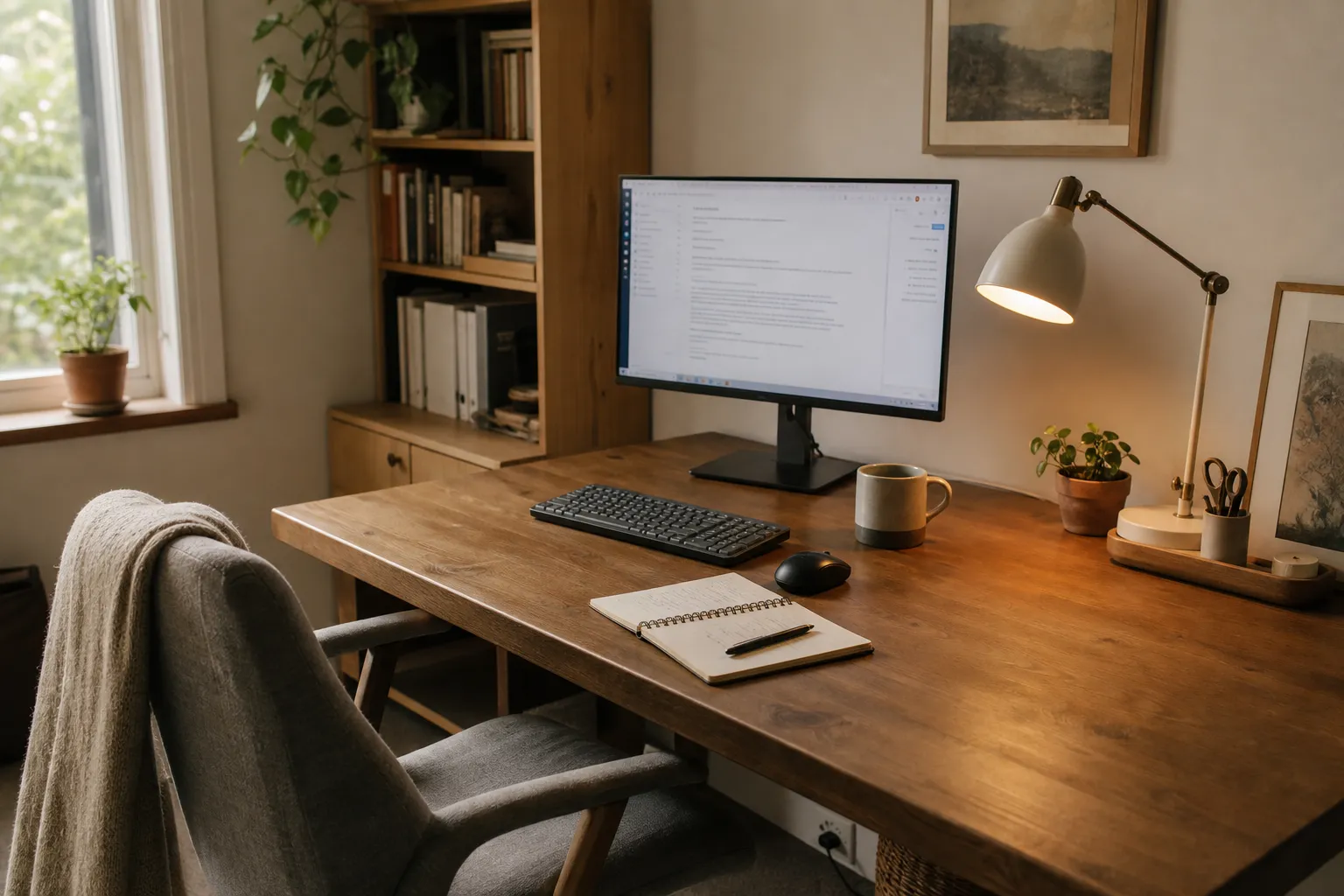
A calm home office setup is rarely about making the desk look empty. Most people want one because the desk has become hard to use: cables gather behind the monitor, the lamp feels sharp, the screen catches a window reflection, papers collect in one corner, and the tools used every day are never quite where the hand reaches.
The useful goal is simpler: a work area that feels visually quiet, keeps equipment reachable, and can be reset without turning every workday into a tidying project.
broader context
Parent topic
Use the broader page when you need more context before this narrower page.
Start with the room problem, not the desk style
A small bedroom, shared living room, dining alcove, or dedicated office can all support a calm desk setup. Each one asks for a different compromise.
A dedicated room gives you more control over storage, printer placement, sound, and visual boundaries. A desk in a shared room needs a lighter footprint: fewer exposed tools, cleaner cable routing, and storage that can close when work ends. A desk in a bedroom or living room also has to look settled when the computer is off, because it remains part of the home after work.
Before buying organizers, stand where the chair will go and check five visible conditions:
- Can the screen sit without strong window reflection?
- Is there a lamp position that lights the work surface without shining into your eyes or onto the screen?
- Can the keyboard, mouse, notebook, and drink fit without crowding the front edge?
- Can cables reach power without crossing a walking path?
- Is there a nearby place for paper, chargers, and small tools that is not the open desktop?
These checks matter more than whether the space looks “zen” in a decorative sense. In an Eastern-inspired home office, calm can come from restraint, negative space, and clear object order. For daily work, that means each visible item should either support the current task, soften the room in a modest way, or be intentionally displayed. Everything else needs a place to go.
A useful starting rule: keep the main work surface for active work, not storage. The desktop may hold a monitor, keyboard, mouse, lamp, one writing tool, one notebook or tray, and perhaps a small natural object if it does not interrupt use. Papers, spare stationery, backup cables, camera gear, manuals, and mail need zones away from the central work area.
Place the desk, screen, chair, and tools as one system
A calm home office desk becomes frustrating when its parts are arranged one by one. The chair is bought first, the monitor is added later, the lamp takes the only empty corner, and storage is forced into whatever space remains.
It works better to treat the desk, chair, screen, light, cables, and daily tools as one small system. Public workstation guidance from OSHA and CCOHS is helpful here as a set of practical checks, not as a reason to turn a home desk into a formal compliance project.
Screen placement
The screen should be stable, easy to view, and not constantly fighting the window.
If the desk faces a bright window, the screen may become reflective. If the window is directly behind the screen, the contrast between a bright background and the display can feel uncomfortable. Many rooms work better with the desk turned so the window sits to the side, then adjusted with curtains, blinds, or a softer shade.
For a small room home office desk, side placement is often the most workable compromise. It preserves daylight, reduces direct reflection, and leaves the wall behind the monitor available for a shelf, pinboard, artwork, or a plain background. If the only possible desk location faces a wall, the setup can still feel calm if the wall stays simple and the task light is controlled.
Keyboard, mouse, and notebook reach
A visually quiet desk should not push tools too far away. The keyboard and mouse need enough clear surface so your hands are not working around stacks of paper. If you write by hand during calls, leave a consistent notebook area on your dominant-hand side. If you rarely write, move the notebook into a drawer or vertical file instead of letting it become permanent scenery.
Build a “first reach” zone for the few things used many times a day. This might include a pen, notebook, headset, charger, and reading glasses. Everything else belongs in a second reach zone, such as a drawer, side cabinet, shelf box, or rolling cart.
Chair and floor area
Even a beautiful desk feels unsettled if the chair cannot move cleanly. Leave enough floor area for the chair to pull back without hitting a printer, basket, or cable bundle. If the office is in a shared room, choose storage that does not block the chair path.
The chair should have one clear resting position at the end of the day. That small habit makes the whole corner look less scattered.
Home office lighting without glare
Lighting is where many calm home office ideas fail in daily use. A warm lamp may look gentle in the evening but cast a hard shadow over paperwork. A bright overhead light may make the room visible but reflect across the monitor. A window may bring pleasant daylight in the morning and become a glare problem later.
Lighting resources from the Illuminating Engineering Society offer useful vocabulary for task lighting and glare. For a home reader, the practical translation is plain: the work surface should be visible, the screen should not act like a mirror, and the lamp should not become the brightest object in your direct line of sight.
Check the desk in three moments, not one:
- Morning or first work period: Does daylight land on the screen?
- Afternoon: Does the sun shift into the desk area or create high contrast?
- Evening: Does the lamp light the keyboard, notebook, and face for calls without feeling sharp?
A calm desk often benefits from layered light: general room light, a task lamp, and controlled daylight. The task lamp usually works best to the side rather than directly behind the screen. If you write with your right hand, placing the lamp on the left can reduce hand shadow; left-handed users may prefer the opposite. Adjustable lamps are useful because the best position changes with paper work, video calls, and screen-only tasks.
For window control, use what fits the room: curtains, blinds, woven shades, or a simple sheer layer. The aim is not to remove daylight. It is to soften direct glare and reduce reflection.
Be cautious with highly glossy surfaces. Glass desktops, shiny black monitor risers, polished metal trays, and reflective picture frames can all add small flashes of light. Matte finishes, wood grain, fabric pinboards, paper shades, and low-sheen ceramics tend to read more quietly in a work area. That is a design and use observation, not a promise that one material will change how well someone works.
Desk storage and cable management that stays usable
A home office without visual clutter depends on two related systems: storage for objects and routing for power. Plan them together, because many daily tools are also cable users.
Think of desk storage in three layers.
Active surface
Current notebook, one pen, keyboard, mouse, daily device.
Best storage style: open, minimal, easy to reset.
Near storage
Chargers, headset, sticky notes, small tools, current files.
Best storage style: drawer, shallow tray, desktop box, side caddy.
Deep storage
Spare cables, old papers, manuals, printer supplies, archives.
Best storage style: closed cabinet, labeled box, file bin, shelf container.
This structure helps prevent the familiar mixed pile: papers, chargers, receipts, and tools all competing for the same open corner.
Home office desk drawer organization for everyday work
A drawer should not become hidden clutter. If you have one drawer, divide it by frequency:
- Front: pen, sticky notes, small scissors, USB drive, reading glasses;
- Middle: charger, adapter, headset accessories;
- Back: less-used supplies, spare notepads, labels.
Shallow compartments are usually more useful than deep bins for daily tools. If the drawer is deep, use small boxes or trays so items do not slide into an invisible layer. Keep only one backup of common items at the desk. The rest can live in a household supply area.
Printer and paper storage for a visually quiet home office
Printers are difficult in calm rooms because they are bulky, corded, and often surrounded by paper. If you print often, the printer needs a stable surface and easy access to paper. If you print rarely, it may not deserve prime desk space.
Better locations include a low cabinet beside the desk, a shelf with enough clearance, or a rolling cart that can tuck away without blocking cords or ventilation. Paper should be stored flat or upright in a closed tray, file box, or cabinet.
Keep “current action” papers separate from archive papers. A single inbox tray is useful only if it is emptied regularly; otherwise it becomes a decorative pile with a label.
For papers, chargers, and daily office tools, avoid making everything visible. Open trays work for active tasks. Closed boxes work better for supplies that only need to be nearby. A calm office usually needs both.
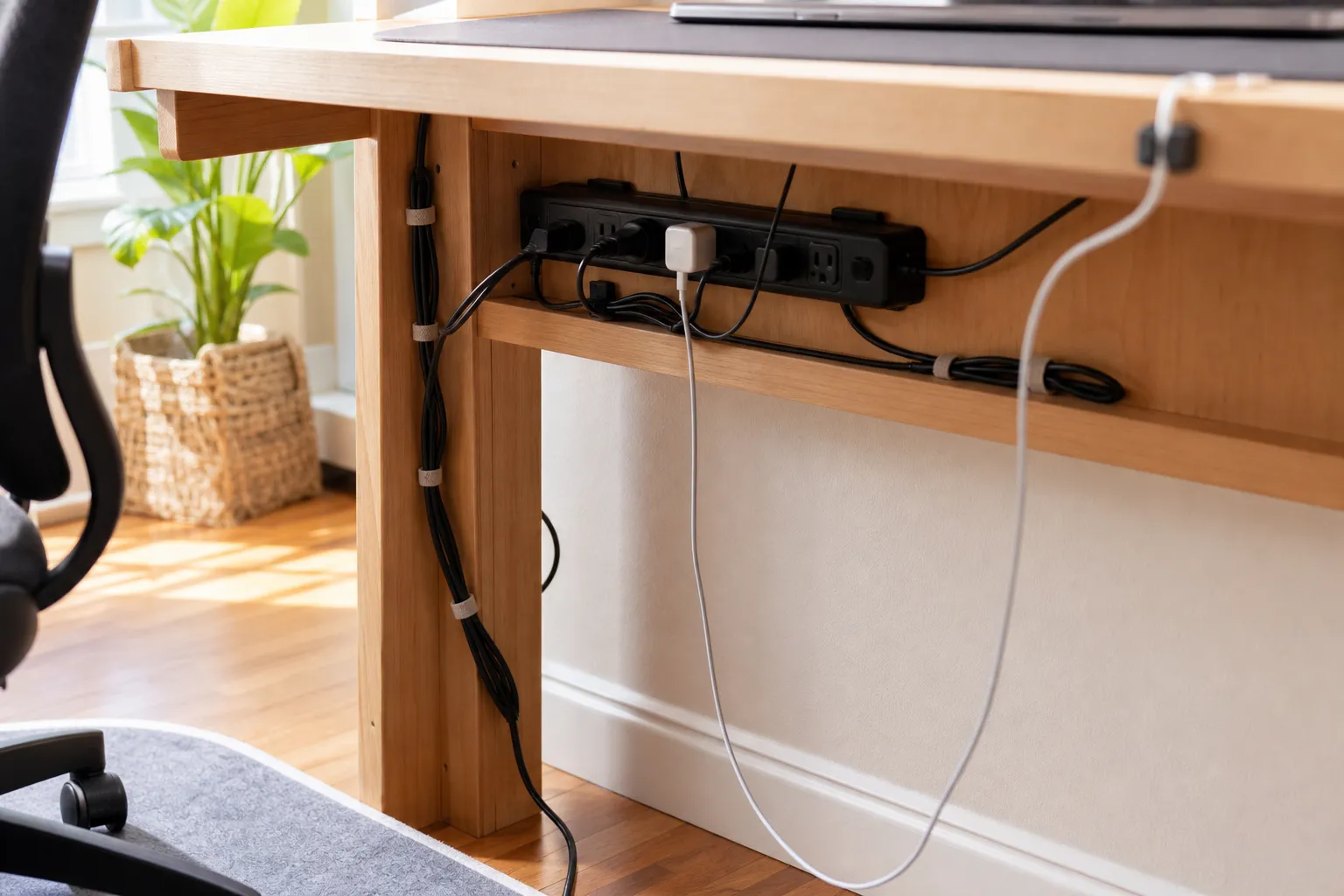
Cable management without drilling
Cable management without drilling can be done with simple tools: removable clips, cable sleeves, hook-and-loop ties, temporary under-desk trays, floor cord covers where appropriate, and a labeled charging box.
The visual goal is fewer dangling lines. The practical goal is that cords remain unpinched, ventilated, and inspectable.
Electrical safety guidance from ESFI gives a useful bottom line: do not overload outlets, do not stack power strips, do not run cords where they become trip hazards, and do not hide power equipment so completely that heat, damage, or loose plugs cannot be noticed. Avoid pressing cords under heavy furniture or tightly coiling excess cable around warm equipment.
A simple routing method:
- Put the power strip where it can be reached and checked.
- Separate permanent cables from daily charging cables.
- Tie long cable slack loosely, not tightly.
- Label both ends of cords if several devices look similar.
- Keep one visible charging point rather than several scattered ones.
- Recheck the setup after moving the desk, adding equipment, or changing the printer location.
If you notice a burning smell, damaged cord, repeated breaker issue, hot plug, or fixed wiring concern, stop treating it as an organization project and seek qualified help.
Natural materials and quiet objects, without giving them too much credit
Natural materials can make a home office feel warmer and less temporary: a wood desk, bamboo tray, paper shade, linen curtain, ceramic cup, wool mat, cork board, or cotton cable pouch. These choices fit many calm home office ideas because they soften the hard, shiny, equipment-heavy feeling that can dominate a computer desk.
The material claims should stay modest. One study on desk surface materials found no significant difference in cognitive performance or affective states from brief exposure to a small wooden desk surface. That does not make wood pointless. It means wood is better described honestly: visually warm, tactile, sometimes repairable depending on finish, and often easier to integrate with home furniture than glossy office materials.
For a calm home office desk area, natural materials work best when they have a job:
- a wood tray to gather chargers;
- a ceramic pencil cup for the few tools used daily;
- a linen curtain to soften window brightness;
- a cork or fabric board for current notes;
- a woven basket for blankets, headset case, or spare paper;
- a paper or fabric lamp shade to reduce visual sharpness.
Keep decorative objects low in number. A small plant, stone, tea cup, or framed image may help the desk feel inhabited, but it should not compete with work tools. The point is not to strip the room of personality. It is to leave enough open space for work to begin without clearing a stage first.
This is where zen home office ideas can remain practical. Use “zen” as a design shorthand for restraint, clear placement, and quiet proportion. Keep it in the language of room arrangement, not guaranteed personal outcomes.
Open shelves or closed storage for a calm home office
Open shelves look light and accessible, but they only stay calm when the objects on them are edited. Closed storage hides visual noise, but it can also become a place where delayed decisions accumulate. The better choice depends on what you store and how often you touch it.
Use open shelves for
- a few reference books used often;
- one or two boxes with repeated supplies;
- a printer only if cords can be handled cleanly;
- objects that look settled when visible;
- a plant or simple vessel that does not crowd equipment.
Use closed storage for
- mixed cables;
- spare chargers and adapters;
- financial or household papers;
- printer paper and cartridges;
- manuals and old devices;
- seasonal or rarely used office items.
If you do not have a closet, small home office storage can come from a low cabinet, lidded boxes under a console, a rolling cart, a wall-mounted shelf with matching containers, or a narrow file unit. The key is not the storage product. It is whether each category has a home.
A useful test: if someone saw the room after work, would the office zone look paused or abandoned?
“Paused” means the chair is tucked in, cables are routed, papers are contained, and one or two active items remain. “Abandoned” means the desktop is carrying unfinished decisions from several days at once.
Video calls that do not take over the room
A home office video call setup should support calls without turning the whole room into a studio. Start with the basics: stable screen or laptop height, a light source that does not create harsh shadow, a background that is not visually busy, and a headset or microphone stored where it can be reached.
The calmest video background is often a plain wall, curtain, shelf with a few edited objects, or closed cabinet. Avoid placing the camera so it shows laundry, kitchen movement, open storage, or a bright window behind your head. If the desk must face a busy room, a folding screen, curtain panel, or tall plant can create a softer boundary.
For lighting, avoid relying only on a bright overhead fixture. A side lamp, shaded task light, or soft front-facing light can be more controllable. If you use a ring light or panel, store it after calls unless it is part of daily work. Equipment left permanently expanded can make a small office feel crowded.
Keep call tools in one kit: headset, adapter, small light, webcam cover if used, and cleaning cloth. Store the kit in a drawer or box near the desk. This keeps the office ready without leaving every accessory on display.
A weekly reset keeps the setup calm
A calm home office setup is not finished on the day it is arranged. It stays useful through small maintenance. The reset should be short enough that you will actually do it.
At the end of each workday:
- return the chair to its place;
- clear cups and dishes;
- put chargers back into the same tray or drawer;
- move active papers into one inbox or file;
- close the laptop or align the keyboard and mouse;
- switch off lamps and equipment as appropriate.
Once a week:
- remove papers that no longer belong at the desk;
- check the cable path for tangles or pinched cords;
- wipe the main work surface;
- remove duplicates and receipts from the drawer;
- adjust the lamp if the season has changed the light;
- review whether the printer, paper, or storage is still in the right place.
Seasonal observation matters in a home office. Sun angle changes. A window that was pleasant in winter may reflect strongly in summer. A warm lamp that felt right in darker months may be too much in longer daylight. A quiet corner may become noisy when windows are open.
Calm is not a fixed style. It is a room condition you keep tuning.
A practical decision frame
If the office feels cluttered, do not begin with decor. Begin with the part that causes the most friction.
- If the screen reflects light, solve desk angle, window covering, and lamp position first.
- If the desktop is always full, separate active work from storage.
- If cables dominate the view, route them carefully and reduce duplicate chargers.
- If tools are hard to reach, build a first-reach drawer or tray.
- If the room looks like work after work ends, use closed storage and a clear chair position.
- If the space feels bare but not calm, add one or two natural materials with a real function.
The best calm home office is not the emptiest one. It is the one where the surface is ready, the light is usable, the cables are controlled, the tools have homes, and the room still feels like part of daily life.